Email signatures
New Outlook only. Takes a minute.
- Find yourself below and click Copy.
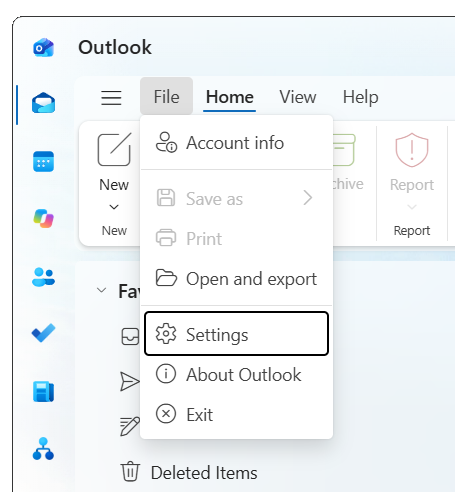
- In Outlook, open File and choose Settings.
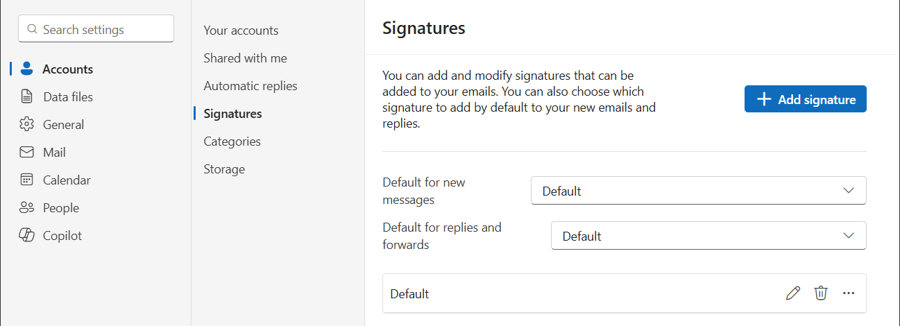
- Go to Accounts > Signatures. Click Add signature, or the pencil beside an existing one to replace it.
- Name it, clear anything in the box, paste, and save.
- Set it as the default for new messages and for replies and forwards.

|
Sean Hindmarch President |
This email and any attachments are confidential and may be privileged. If you are not the intended recipient, please notify the sender and delete it; any use, disclosure or copying is prohibited. |
|
|
Jason Isaac, CFA, CAIA Chief Investment Officer |
This email and any attachments are confidential and may be privileged. If you are not the intended recipient, please notify the sender and delete it; any use, disclosure or copying is prohibited. |
|
|
Chris Bolton, CFA Portfolio Manager, Fixed Income |
This email and any attachments are confidential and may be privileged. If you are not the intended recipient, please notify the sender and delete it; any use, disclosure or copying is prohibited. |
|
|
Derek VanGenderen, CFA Portfolio Manager, Global Equities |
This email and any attachments are confidential and may be privileged. If you are not the intended recipient, please notify the sender and delete it; any use, disclosure or copying is prohibited. |
|
|
Ryan Turner, CFA Chief Technology Officer |
This email and any attachments are confidential and may be privileged. If you are not the intended recipient, please notify the sender and delete it; any use, disclosure or copying is prohibited. |